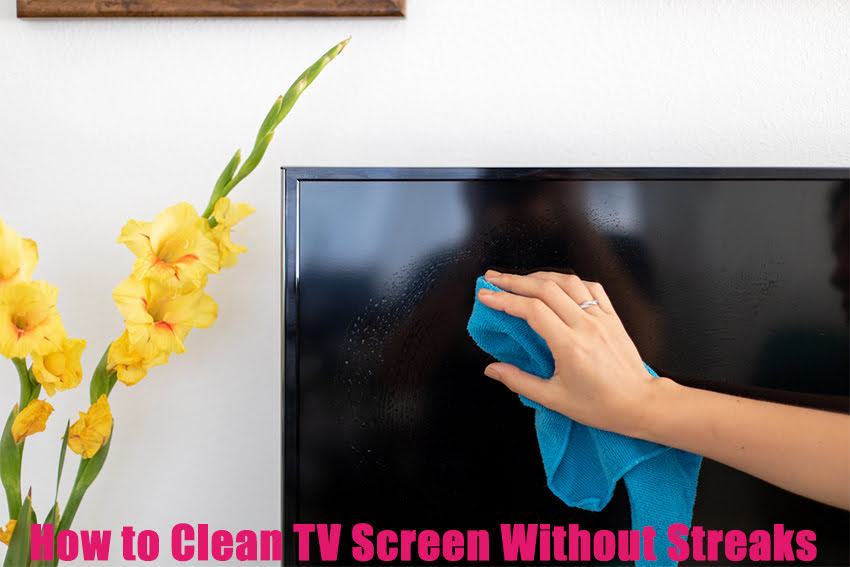
How to Clean TV Screen Without Streaks: TV screens attract dust easily and need to be cleaned regularly. If you’ve ever wiped your screen only to find streaks left behind, you’re not alone. In this guide, I’ll explain how to clean your TV screen effectively without leaving streaks. Cleaning a TV screen is trickier than cleaning windows or glass surfaces. You shouldn’t simply splash water or cleaning liquids onto the screen and wipe it down. Even a small amount of liquid can damage pixels or cause other problems, especially with modern flat-screen TVs.
There are many ways people clean their TV screens, but it’s crucial to avoid scratching the surface, damaging any special coatings, or allowing moisture or chemicals to seep into the internal parts of your TV. Using the wrong cleaning method can cause permanent damage. For the safest and most effective cleaning, it’s best to consult your TV’s owner’s manual, as manufacturers often provide model-specific cleaning guidelines.
Privacy Alert! Your data is exposed to the websites you visit! The information above can be used to track you, target you for ads, and monitor what you do online. We recommend ExpressVPN — the #1 VPN out of over 350 providers we've tested. It has military-grade encryption and privacy features that will ensure your digital security, plus — it's currently offering 48% off. Your IP Address: Loading...
 Your Location: Loading...
 Your Internet Provider: Loading...
Materials You Can Use to Clean Your TV Screen
You want your screen to be free from dust, streaks, smudges, and stains, but at the same time, you need to protect it from damage caused by certain cleaning products.
Here are some recommended materials for safely cleaning your TV screen:
Microfiber Cloth
Microfiber cloths are soft, highly absorbent fabrics commonly used for cleaning delicate surfaces. They can hold several times their weight in liquid, making them ideal for cleaning TV screens, windows, camera lenses, and other glass surfaces prone to streaks. Microfiber is far better than paper towels, which can scratch your screen and leave behind fibers. Paper towels also contain wood-based fibers that may harm the anti-glare coating on flat-screen TVs.
For the best results, use two microfiber cloths: one slightly damp for cleaning and a dry one to polish your screen to a streak-free shine. Be sure to wash your microfiber cloths regularly to avoid trapping dirt or debris, which can scratch your screen. Washing is simple — just machine wash or hand-wash them gently.
Cleaning Solutions
While some recommend using only a dry cloth to clean your TV screen, a bit of moisture can help remove stubborn stains and grime. However, it’s crucial to use the right cleaning solution to avoid damaging your screen. Avoid products containing alcohol, ammonia, acetone, or any harsh chemicals, as these can harm your screen’s delicate surface. Instead, opt for a screen-specific cleaning solution that effectively removes dirt without causing damage.
If you prefer, you can make your own cleaning solution at home using:
- 1 part distilled water (important to use distilled)
- 1 part vinegar
Put the mixture in a spray bottle and lightly spray your microfiber cloth — never spray directly onto the screen, as moisture can seep inside and damage the electronics. For everyday cleaning, distilled water alone usually works well. You can skip the vinegar if you don’t like the smell—it dissipates once dry anyway. Alternatively, mixing a drop or two of mild dish soap with a cup of distilled water can boost cleaning power, but be mindful of the suds. Generally, distilled water or the distilled water-vinegar mix is enough to keep your screen spotless and streak-free.
Feather Duster
This one is simple: since your TV is exposed, it naturally collects dust over time. Using a feather duster regularly helps prevent dust buildup on the screen. Gently brushing the feather duster across your flat-screen or tube TV can also remove loose debris stuck on the surface. Doing this once a week means you won’t need to do deep cleanings as often.
Special Cleaning Products
Besides the materials mentioned earlier, there are specialized products like cleaning wipes and sprays designed specifically for TV screens. If your TV’s owner’s manual recommends using certain products, it’s important to follow those instructions carefully to avoid damaging your screen. Using the right products can also help extend the life of your TV.
1. ExpressVPN — Best VPN With the Fastest Speeds for Smooth Streaming

Best Feature
The fastest speeds we tested, ensuring you can stream, browse, game, and torrent without interruptions
Server Network
3,000 servers in 105 countries give you fast worldwide connections
Simultaneous Device Connections
Up to 8, so you can protect your compatible devices under one subscription
Works With
Netflix, Disney+, Amazon Prime Video, BBC iPlayer, (HBO) Max, Hulu, Vudu, DAZN, and more
2. NordVPN — Best VPN With the Fastest Speeds for Smooth Streaming

Best Feature
High security features and fast speeds for a reliable connection
Server Network
5,400 servers in 60 countries for improved accessibility and connection speeds
Simultaneous Device Connections
Up to 6 devices, suitable for protecting multiple devices simultaneously
Works With
Netflix, Disney+, Amazon Prime Video, BBC iPlayer, (HBO) Max, Hulu, Vudu, DAZN, and more








How to Clean Your TV Screen Without Streaks
Now that you know what materials to use, let’s move on to the proper steps for cleaning your TV screen. First and foremost, always turn off your TV and unplug it before cleaning. This reduces the risk of electric shock and helps you see smudges and dust more clearly on a dark screen.
Cleaning Flat Screen TVs
These instructions apply to plasma, LED, OLED, and LCD screens. These screens are more delicate than older tube TVs and require gentle care. You can generally follow these steps for most flat screens, but if your owner’s manual has different recommendations, always prioritize those.
What you need:
- The TV screen
- A spray bottle filled with a gentle cleaning solution (distilled water is best)
- Two microfiber cloths
Steps:
- Prepare your cleaning solution in a spray bottle. Start with distilled water alone unless your TV maker suggests a specific cleaner. Avoid tap water. Specialized HDTV screen cleaners are also fine if available.
- Turn off and unplug your TV, then let it cool for about a minute.
- Use one dry microfiber cloth to gently wipe the screen, removing loose dust. For light cleaning, this might be enough.
- If dirt or smudges remain, lightly spray your cleaning solution onto a second microfiber cloth—never spray directly on the screen.
- Wipe the screen gently in circular motions, concentrating on smudged areas. Add more solution to the cloth if needed.
- Finally, use the dry microfiber cloth to remove any moisture and prevent streaks, leaving the screen clean and clear.
Cleaning Tube TVs
Older tube TVs have glass screens, which are sturdier than modern flat panels but still need careful cleaning.
What you need:
- The TV screen
- A spray bottle with cleaning solution
- One microfiber cloth and an additional dry cloth
Steps:
- Turn off and unplug the TV, allowing it to cool down.
- Use a dry cloth to dust off the screen first.
- Dampen the microfiber cloth with water, glass cleaner, or a window cleaning spray (such as Windex). Gently wipe the screen in circular motions.
- Finish by drying the screen with the clean side of your dry cloth to eliminate streaks.
Following these steps will help keep your TV screen spotless and streak-free without causing any damage.
Best VPN deals this week:


How to Remove Scratches
This guide focuses on removing dirt, stains, and streaks from your TV screen, but it won’t fix scratches. Before attempting any scratch repair, check your TV’s warranty—some larger scratches may be covered, allowing you to get a repair or replacement.
If scratches aren’t covered or they are minor, here are a couple of options:
- Use a scratch repair kit: Available online or at hardware stores, these kits are usually affordable and come with instructions to safely repair minor scratches.
- DIY with petroleum jelly: Dab a small amount of petroleum jelly onto a cotton ball or your finger and gently rub it over the scratch. Then, wipe the screen surface clean with a microfiber cloth.
How to Clean TV Speakers
Although dirt on your TV speakers won’t affect the picture quality, it can muffle the sound. It’s a good idea to clean the speakers after you finish cleaning the screen. If your speaker covers are removable, carefully take off the grill and wipe it with a dry cloth. Then, clean it further using wet wipes or a lint roller. Compressed air cans are also great for blowing away stubborn dust and debris trapped inside the grill.
How to Clean the TV Remote Control
Your remote control can transfer dirt and oils to your TV screen, and it’s also a hotspot for bacteria, so cleaning it regularly is important.
Steps to clean your remote:
- Remove the back cover and take out the batteries.
- Turn the remote upside down and gently tap it on a hard surface to shake loose dust and debris. Repeat until most dirt is gone.
- Apply a cleaning solution (such as distilled water, distilled water mixed with vinegar, commercial screen cleaner, or rubbing alcohol) to a soft cloth and wipe the remote’s surface.
- For hard-to-reach areas like buttons and grooves, dip a cotton swab into the cleaning solution and carefully clean those spots.
- If you didn’t use alcohol initially, follow up by wiping the remote with a cloth dampened with a mild disinfectant.
- Allow the remote to dry completely before reinserting the batteries and replacing the cover.
Important Tips to Remember
- Avoid using window cleaners like Windex on flat-screen TVs, as these chemicals can damage newer screen coatings. They are safe only for old tube TVs with glass screens.
- Never use cleaning solutions that contain alcohol, ammonia, harsh detergents, or acidic/alkaline chemicals on your TV screen.
- After turning off and unplugging your TV, wait about 30 seconds before cleaning. Cleaning while the screen is still warm can cause streaks.
- Do not spray any cleaning liquid directly onto the screen. Spraying directly can cause the screen to become too wet, leave streaks, and potentially let liquid seep inside, causing damage. Always spray onto a cloth first.
- Follow your TV manufacturer’s cleaning instructions if they differ from general advice—these are the most reliable guidelines.
- Clean your screen regularly to prevent buildup of dust and grime. A weekly cleaning routine helps maintain the screen, speakers, and remote control in good condition.
Wrapping Up
In this article, I’ve shared the best methods to clean your TV screen without leaving streaks. Sometimes, a simple wipe with a microfiber cloth is enough, but for tougher spots, the tips provided here will help you get your screen spotless. Do you have any special cleaning tips or tricks for your TV screen? I’d love to hear them—please share your secrets with me and other readers!
FAQs
How do I clean a flat-screen TV without damaging it?
To safely clean a flat-screen TV, turn it off and unplug it. Use a dry microfiber cloth to gently remove dust. If needed, lightly dampen another microfiber cloth with a screen-safe solution like distilled water or a water-vinegar mix (never apply liquid directly to the screen). Wipe in gentle circular motions, then dry with a clean cloth to avoid streaks.
Can I use Windex or glass cleaner on my TV screen?
No, you should avoid using Windex or other glass cleaners on flat-screen TVs like LED, OLED, or LCDs. These products often contain alcohol or ammonia, which can damage the screen’s protective coating. Use only manufacturer-approved or gentle, homemade screen-safe solutions.
What is the best homemade cleaner for TV screens?
A safe and effective homemade screen cleaner is a 1:1 mix of distilled water and white vinegar. You can also use just distilled water for light cleaning. Spray the solution on a microfiber cloth—never directly on the screen—and wipe gently.
How often should I clean my TV screen and speakers?
It’s a good idea to clean your TV screen and speakers about once a week to prevent dust and grime buildup. Regular maintenance helps keep your screen looking clear and your speakers sounding crisp without requiring deep cleaning.
How do I clean between the buttons on my TV remote?
To clean between the remote buttons, use a cotton swab dipped in a mild cleaning solution like rubbing alcohol or distilled water. Carefully clean around each button to remove grime. For full disinfection, follow up with a disinfectant wipe or cloth.
Why does my TV screen still have streaks after cleaning?
Streaks are often caused by using too much cleaning solution, the wrong type of cloth, or wiping the screen while it’s warm. Always use a dry microfiber cloth for final wiping and ensure the TV is cool and unplugged before cleaning.
Best VPNs for Streaming — Final Score:
Rank
Provider
Overall Score
Best Deal

9.8
★★★★★
save 84%
VISIT WEBSITE >
9.6
★★★★★
save 83%
VISIT WEBSITE >

9.4
★★★★★
save 84%
VISIT WEBSITE >